Basementgrid makes it easy to generate audit-ready reports and compliance logs directly from your mobile device. Whether you need financial records for council meetings or vendor metrics for contract renewals, you can pull complete logs in just a few taps.
Step-by-Step: Generating a Report
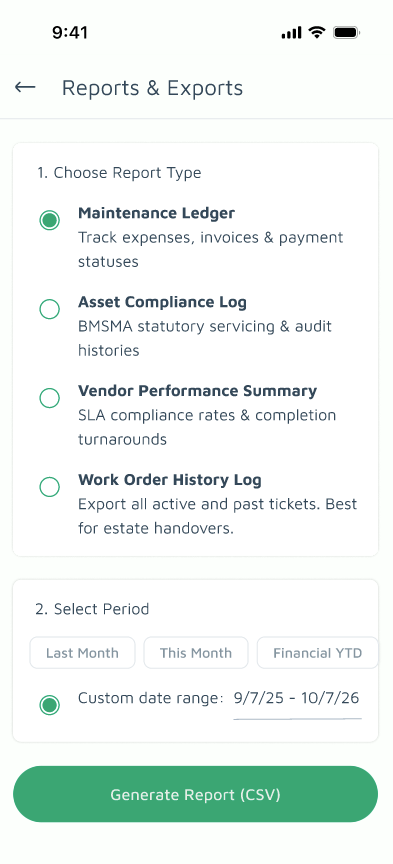
Step 1. Navigate to Reports & Exports
Tap your Estate Profile photo in the app, then select Report from the menu to open the Reports & Exports page.
Step 2. Select Your Report Type
Choose the specific log or report you need. Tap the report name below to understand exactly what each one covers and what the data means:
- Maintenance Ledger: Complete record of maintenance actions, expenses, and updates.
- Asset Compliance Log: Statutory and inspection records for estate equipment and assets.
- Vendor Performance Summary: Response times, SLA compliance, and completed task history for vendors.
- Work Order History Log: Comprehensive archive of all issued, active, and completed Work Orders.
Step 3. Set the Timeframe
Under Select Period, pick the date range you wish to export:
-
Last month
-
This month
-
Financial YTD (Year-To-Date)
-
Custom date range
Step 4. Generate & Share
Tap Generate & Share. Your report will be processed instantly and bring up your device's native share menu.
Pro Tip: Sending a copy to yourself
Need a quick copy saved on your phone or computer? When the share menu pops up, you can easily WhatsApp it to your own number or email it directly to yourself for quick desktop access later.
