The Work Order History Log is the most comprehensive report in Basementgrid — a complete record of every work order created in your workspace, filtered by the date it was created.
Purpose
Unlike the other reports, which each focus on a specific angle (vendor performance, financial reconciliation, or statutory compliance), the Work Order History Log captures every work order created within your selected date range, across every status, type, and vendor. It's built to serve a wide range of purposes — audits, council reporting, dispute resolution, or simply tracing the full history of a specific job.
How to Generate the Report
- Access Workspace Settings
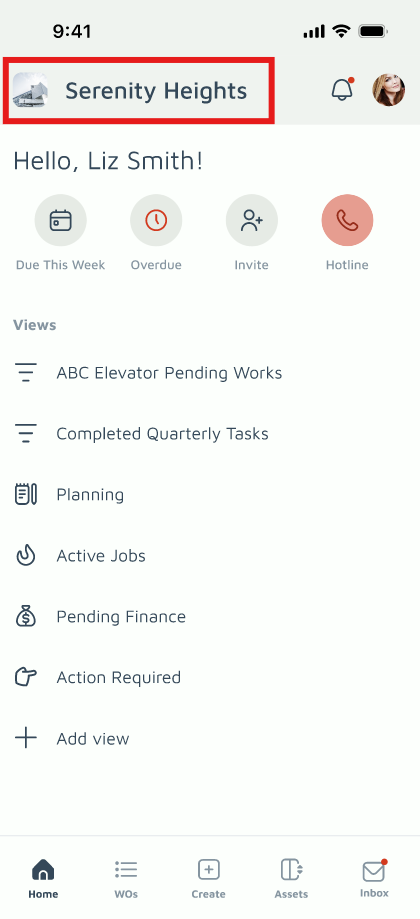
Tap Workspace Settings in the top-left corner of the Home Page.
- Navigate to Reports
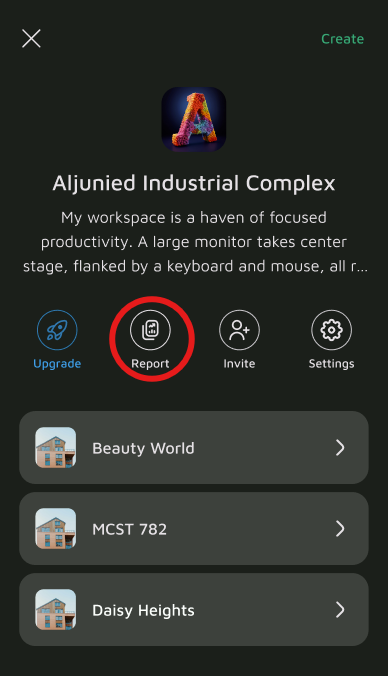
Go to the Reports section and select Work Order History Log.
- Select Your Date Range
Choose the date range you want to review. This filters by the date the work order was created — not its due date or completion date.
- Generate and Export
Tap Generate & Share. You can view the log on-screen or export it for your records.
Understanding the Report Columns
| Column | What It Shows |
|---|---|
| # | The unique work order number, used to trace the entry back to its full history. |
| Title | A short description of the job. |
| Status | The current main status of the work order (Draft, Pending, In Progress, Review, Completed, or Cancelled). See Understanding Work Order Statuses for full details. |
| Label | The sub-status providing more granular tracking within the main status (e.g., Pending Invoice, Re-work). |
| Type | The work order category — Reactive, Emergency, Periodic, Compliance, or Improvement. |
| Priority | The urgency level assigned to the work order (e.g., High, Medium, Low). |
| Create At | The date and time the work order was created. |
| Created By | The name of the person who raised the work order. |
| Due On | The target completion date for the work order, if applicable. |
| Recurring | Indicates whether this work order is part of a recurring schedule. |
| Location | Where in the estate the work order applies. |
| Asset | The specific asset the work order was raised against, if applicable. |
| Vendor | The vendor organization assigned to the job. |
| Technician | The individual technician who carried out the work. |
| Paid On | The date payment was made, for work orders requiring payment. |
| Payment Ref. | The transaction or reference number tied to the payment. |
| Paid By | The name of the person who processed or authorized the payment. |
| Updated On | The date and time the work order was last updated. |
Why This Report Matters
Because it captures every work order regardless of status, the Work Order History Log is often the first place to look when tracing a job's full lifecycle, resolving a dispute over what was done and when, or compiling records for an AGM or audit.
