Before you start
You only need two things:
- The email address you were invited with. This is the email where you got the "You're invited" message. It is your username.
- Your password. You created this when you first accepted the invite.
If you are not sure which email you used, look in your inbox for an email from Basementgrid.
How to log in
- Open the Basementgrid app and go to the login page.
- In the Email box, type your email address. Do not type your name or company name.
- In the Password box, type your password.
- Tap Log in.
That's it. You will see your jobs after you log in.
Tip: Tap the small eye icon in the password box to see what you typed. This helps if you are not sure you typed it correctly.
How to log out
- Tap the profile icon at the top right.
- Tap Log out.
You will go back to the login screen. Your jobs are safe. Nothing is deleted when you log out.
How to log in again
Same as before. Type your email, type your password, tap Log in.
If you are both a Vendor Manager and a Vendor Technician
Some vendors run the company and also do the work themselves. In Basementgrid, these are two different roles:
- Vendor Manager: sees all your company's jobs and manages your technicians.
- Vendor Technician: sees only the jobs assigned to that technician.
You need one email address for each role. Use your manager email to log in as Vendor Manager. Use your technician email to log in as Vendor Technician. To switch, log out first, then log in with the other email.
How to know which role you are in
- Tap the profile icon and open your Profile page.
- Look for a section called Company details.
- You can see Company details: you are logged in as Vendor Manager.
- You can't see Company details: you are logged in as Vendor Technician.
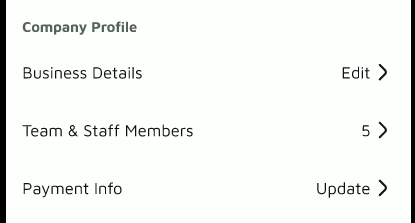
If you are in the wrong role, log out and log in again with the other account.
Something not working?
| What happened | What to do |
|---|---|
| "Wrong email or password" | Check for spelling mistakes or extra spaces. Make sure you are using the same email you were invited with. |
| I forgot my password | Tap Forgot password, enter your email, and follow the link we send you. Check your spam folder if it doesn't arrive. |
| I can't see the jobs I expected | You may be logged in as the wrong role. Log out and log in again using the other role. |
| I never got the invite | Ask the person who invited you (your Building Manager) to send it again. |
Still stuck? Email us at support@basementgrid.com and tell us your name and company. We'll help you get in.
